OpenUpEveryTech

Enhance your Future

Get Update on our recent Gadgets & Tabs

Showing posts with label General. Show all posts

How to Spy and Read WhatsApp Conversation of Your Friend


Yes, it is possible and i’ll explain you about this awesome trick through which you can spy your friends conversation. Just follow the below mentioned steps.

Just trick your friend to connect his phone to your PC via USB cable and then steal a file. Takes only 2 minutes.


  1. Borrow your friend’s phone for few minutes.
  2. Connect it to your computer via USB.
  3. Go to folder named whatsapp/Databases
  4. Two files are there named msgstore-yyyy..dd..db.crypt and -msgstore.db.crypt
  5. Copy them to your computer . Rename that file from “msgstore-YYYY-MM-DD.1.db.crypt” to “msgstore.db.crypt” If the file is called “msgstore-YYYY-MM-DD.1.db.crypt5”, rename it to “msgstore.db.crypt5”
  6. Now Uninstall and Install whatsapp on your Phone.
  7. Move those copied files msgstore-YYYY-MM-DD.1.db.crypt and -msgstore-YYYY-MM-DD.1.db.crypt5 to your whatsapp/Databases folder on your phone.
  8. Whatsapp will ask for restore. Choose restore from backup.As Shown Below Cheers , you have all your friend’s whatsapp conversation on your phone.

Enhance Your Programming Interview Skills

Do you get stuck on technical programming interview questions and cannot advance further? Depending upon on how much is your educational qualification and the knowledge associated with it, internships can be rough to get through. There are some people whose knowledge and experience outdo their undergraduate education before entering university and likely to get internships in their first two years. Similarly, there are some people who are most likely successful in getting internships in their junior year that front load their CS classes and practice programming with a desire.
The challenge to get selected for a job is sometimes due to interview skills or sometimes due to technical skills. For instance, juniors are expected to level a binary tree into a linked list, if they have completed their CS courses early or on-time. If you are unable to complete this, then it indicates that it would be better to use your time to enhance your design, programming, and algorithm skills. Also, it may be very hard for you to be successful at a major tech company if you are hired, if you are unable to solve problems like this by the time you are an intern or employee.
Hence, it is recommended that you study essential computer science concepts and practice doing programs for a few hundred hours. If you are able to program for four hours a day for six days a week, it will reap results for you all your life.

1. Learn how to implement linked lists, doubly linked lists, binary search trees, tries, heaps, and hash trees. Learn the fundamental data structures.

2. Learn class design and fundamental data organization. Be able to design data structures and classes to work as nodes in trees and tries; to summarize details about people, including addresses and phone numbers; to exhibit polymorphism and sub-classing, such as ‘shape’ specific to ’2d’ and ’3d’ and further dedicated to various kinds of shapes, with over-ridable functions to implement width, height, area, and so on. Learn about the dissimilarity between classes and interfaces. Learn about polymorphism of both intrinsic and structured data types.

3. Learn important algorithms and techniques: Sort, selection, recursion, iteration, and mapping between recursion and iteration for resolving common problems.

4. Implement all of the structures, classes, and algorithms mentioned above from beginning. Then, learn any intrinsic functions which support them by heart.

5. Get a good book like Cormen’s Introduction to Algorithms. Read the sections applicable to the knowledge mentioned above. Try some of the problems in each section. They are difficult and time consuming, but they are great to practice.

How To Find IMEI Number Of Your Phone Even your mobile is "Lost" or "Stolen"

The IMEI, or International Mobile Station Equipment Identity, is a unique number which is associated with your phone. The IMEI number becomes very important in the emergency situations as it’s the fingerprint of your phone. Here, I’ll be telling you various methods to find your phone’s IMEI number, even if it’s lost.
    he IMEI number, also known as MEID number, acts your phone’s unique identifier. As no two devices have the same IMEI or MEID number, it becomes the best tool to track lost phones.
This unique number is assigned to every new phone and it’s actually associated with the SIM card slot. So, if you are using a dual-SIM device, your phone will have two IMEI numbers.
 
  
As I told you about, phone’s IMEI number becomes very important in case it’s lost or stolen. There are multiple ways to find your phone’s number. Let’s take a look:
Method 1: USSD code to find IMEI number
It is very easy to find IMEI number of your mobile phone as it can be usually found printed inside the battery compartment of the phone.
Also, you can just USSD code and dial *#06#, the IMEI will be displayed instantly on the screen.
andorid-imei
Method 2: Looking in Settings to find IMEI number
You can also find the IMEI number of your Android phone by navigating into Settings> About Phone> Status> IMEI Information.
iPhone users can find the IMEI number by navigating into Settings> General> About> IMEI. 
imei-android
Method 3: How to find IMEI number if you’ve lost the phone
Although you can see it’s very easy to find IMEI number of your phone, but what if you lost it? You can always check your retail box and bill because both have the IMEI number written on them.
In the extreme cases if an Android user lost his retail box and bills too, he/she can try this method.
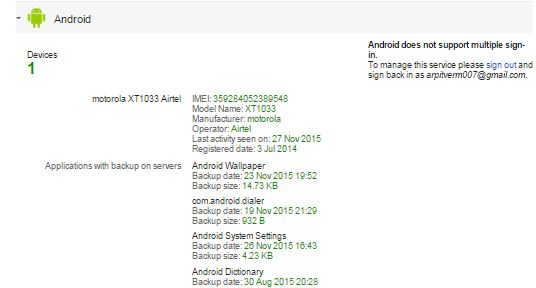
First sign in to the Google Dashboard using your Google account which is linked to the lost Android phone. Now just click the Android logo and it will show you all the devices connected to that Google account along worth their IMEI numbers.
IMEI
Did you find this method of finding IMEI number easy and reliable? Let us know in comments below.

How to Remove Shortcut Virus in 3 Easy Ways

What is Shortcut Virus?

Shortcut-virus is a virus which Enters in to your Pen drive, PC, Hard Disk, Memory cards or mobile phone and change your files into shortcuts with the original folder icons.

When you Plugin your Pen drive in Your friend’s Shortcut-Virus affected PC or when you insert your Friends virus infected USB to your Computer, You may get this virus too. Be cautious before Pairing devices, I have seen this problem in PC having antivirus too.  Below are the 3 best Methods to Delete this Shortcut-Virus.

  1. Remove Shortcut Virus using CMD(Command Prompt),
  2. Using WinRAR to get original Data or files
  3. Using Shortcut Virus Remover software.
1.Remove Shortcut Virus Using CMD :
Here are the Steps to Remove the Shortcut-Virus using CMD, Using command prompt to remove and recover files is the best way and there are 95% Possibilities of virus removal. This method removes shortcuts virus from Pendrive, Memory Cards,HardDrives,Even works for Mobile's Steps are given below
  • Go To Start -> Run ->cmd (or) Press Windows Button + R
  • Go to your Effected Drive using CD (Change Directory command)
  • Type attrib -h -r -s /s /d example:*.*(example > Drive letter)
  • Press Enter 
 

2 Use WINRAR to Get Original Files

Even after using CMD if still the shortcut virus remains, you can use the WinRar to Recover back the files, Since WinRar allows one process to execute and no Shortcut virus could work inside the WinRar Just follow the below-given instructions
  • Open WINRAR Application.
  • Navigate to your Pen drive location or PC Folder location.
  • Copy Files and Paste where you want.
  • Format your Pen drive.

3 Shortcut virus Remover

 The Shortcut virus Runs in the Task Manager Process, and you can easily find and delete the “Wscript.vbs” and also here is a software to remove the file in seconds Shortcut-virus remover.
Precautions to Avoid Shortcut-Virus:
Following are the Precautions to be taken to avoid Shortcut-virus from Entering into your personal devices,
  1. Disable Autorun, So that Pendrive won’t runs automatically
  2. Scan for virus and then use the Pendrive,
  3. Don’t use Pendrive in Public PC’s.
  4. Don’t use Harmful websites.
  5. Keep your Antivirus upto date.

Lock Your PC using Your Face (Login to Your PC by Simply Looking at It!)

Login to Your PC by Simply Looking at It!>>>


Logging into Windows has never been easier! Simply look into your webcam and you’ll be logged into your account in the blink of an eye. Blink! employs advanced face recognition technologies to provide automatic, quick and reliable login for one, or multiple, computer users.

Some Useful Run Commands For Windows

The Windows version uses basically on MS Dos usually called as RUN prompt
Some Useful Run Commands F
or Windows...
Hey, Our Facebook Page is under this link ;ll like it - Facebook Page
Join Our Newsletter